


App for Italian freelancers · forfettario, ordinario, employee
Your Italian freelance taxes, without the surprises.
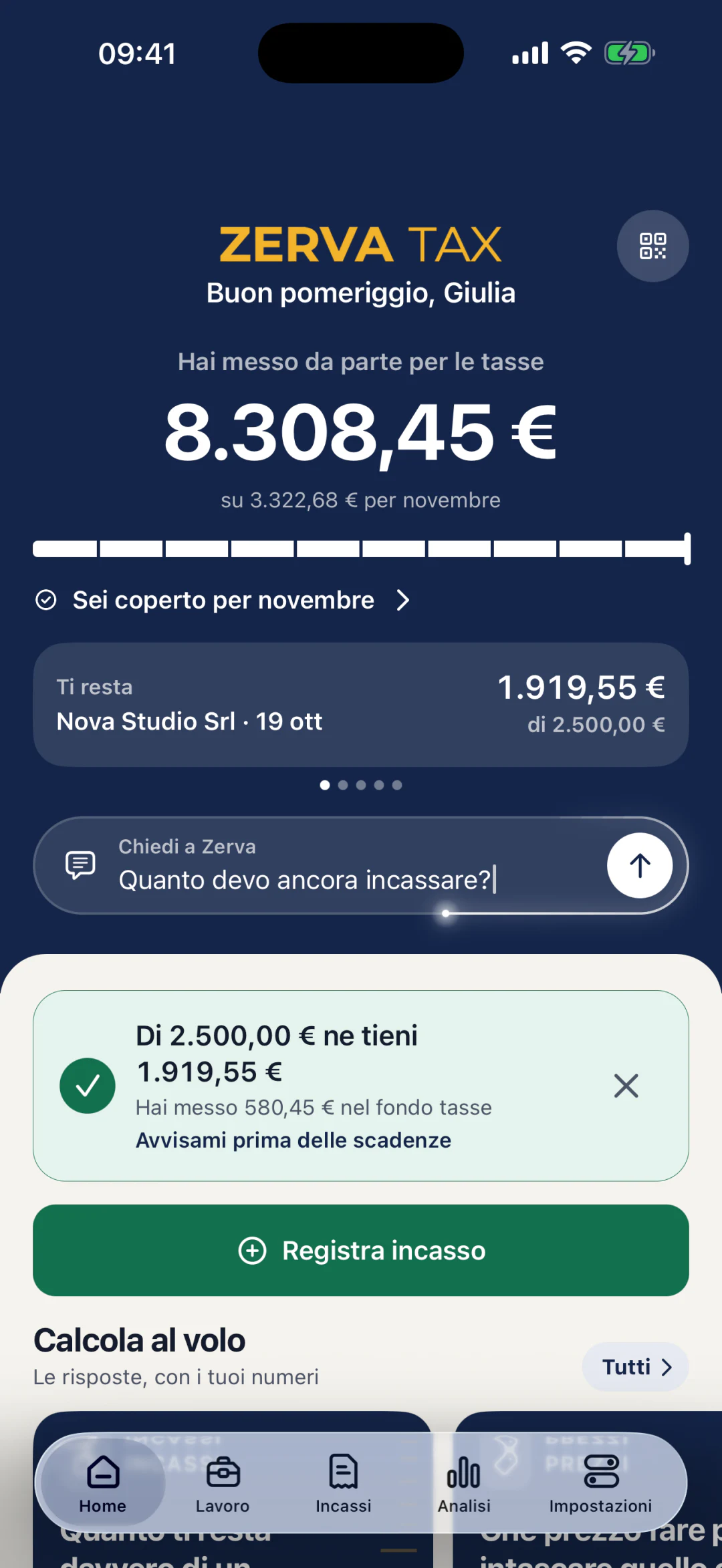
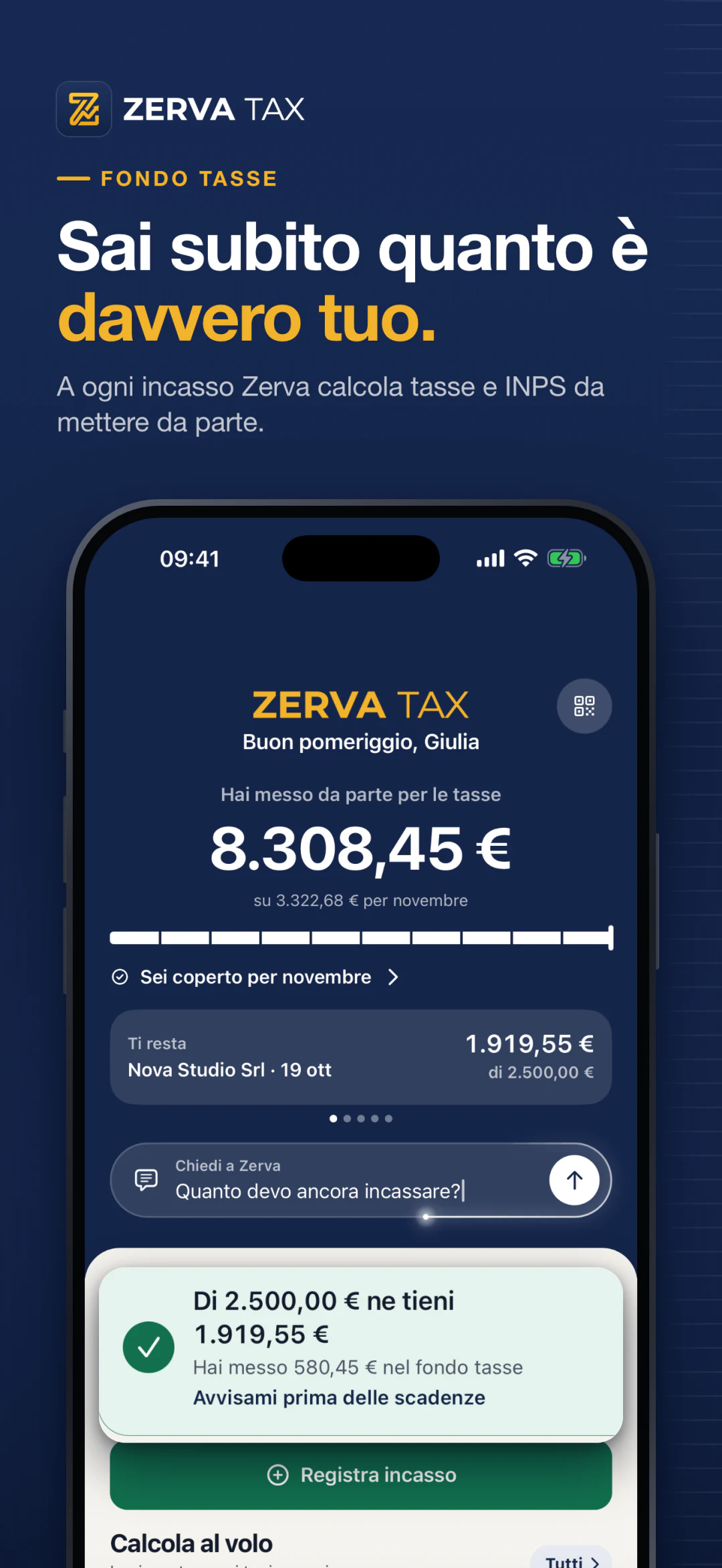
Just got paid €2,000? Zerva tells you right away how much is yours and how much to set aside for taxes and INPS. So in June and November your F24 is already covered.
14 days of Pro included · No account · Data stays on your iPhone
- Price
- Free
- Pro with 14 days included
- Device
- iPhone
- iOS 17 or later
- Language
- Italian
- Italian App Store
- Account
- None
- Data stays on your phone
- Category
- Finance
- Forfettario and ordinario
Preview
Taxes, INPS and deadlines for your partita IVA, in one app.

The problem
Your account looks full. But it's not all yours.
With a partita IVA, taxes are due months after you get paid. Meanwhile, that money feels like yours.
Your bank balance lies
You see a full account and you spend. But part of that money already belongs to the tax office and INPS, and you find out when the F24 arrives.
June and November hit twice as hard
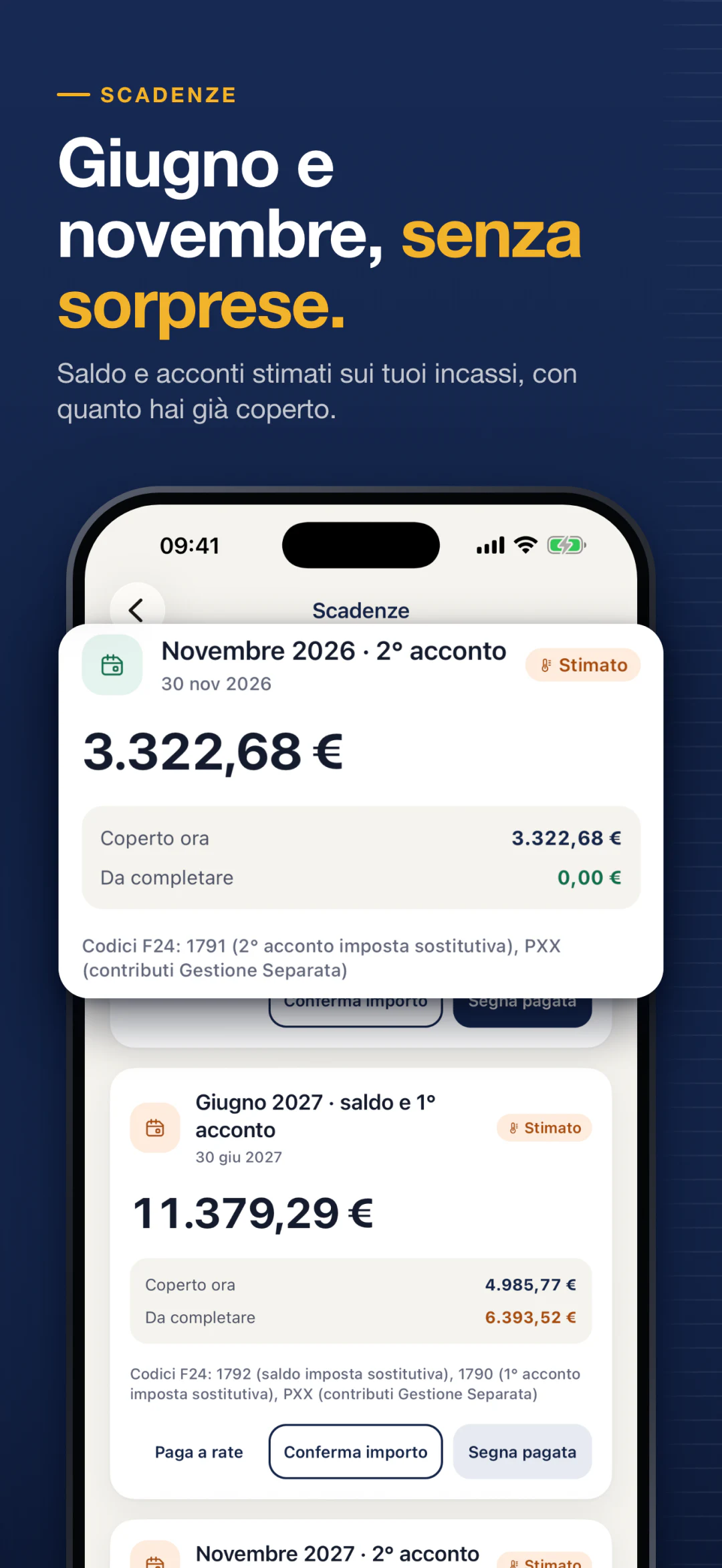
In June the balance for last year and the first advance for this year come due together. It's the month many freelancers discover they spent money that wasn't theirs.
Salary and partita IVA don't talk to each other
If you're also an employee, salary and invoices add up in your tax return. Working out what you really keep becomes a puzzle.
Zerva does the math on every payment: you always know what's yours and what to set aside.
For every situation
One app for every tax regime: forfettario, ordinario, employee, hybrid.
Pick your situation when you start. Zerva applies that regime's rules and shows you the results, not the formulas.
Forfettario
Partita IVA with revenue up to €85,000
On the forfettario flat-rate regime? On every payment Zerva tells you how much to set aside for tax and INPS. And it warns you before you reach €85,000.
Ordinario
Partita IVA with IRPEF brackets and VAT
In the ordinario regime, costs, VAT and IRPEF brackets all count. Zerva puts them together and tells you how much is yours after every invoice.
Employee
Salary only
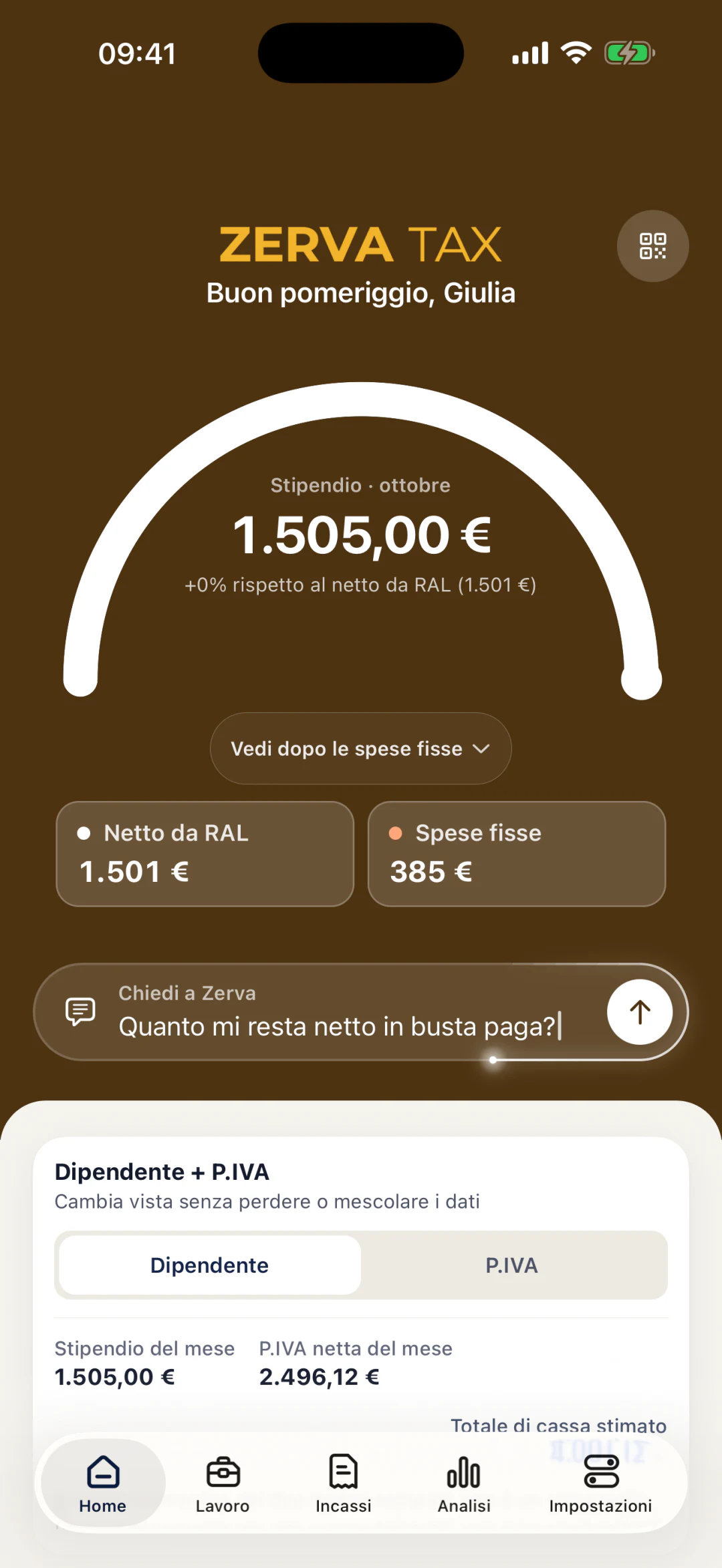
Zerva works out your net pay, including the 13th and 14th month, takes out fixed costs and goals, and tells you how much you can spend this month.
Hybrid
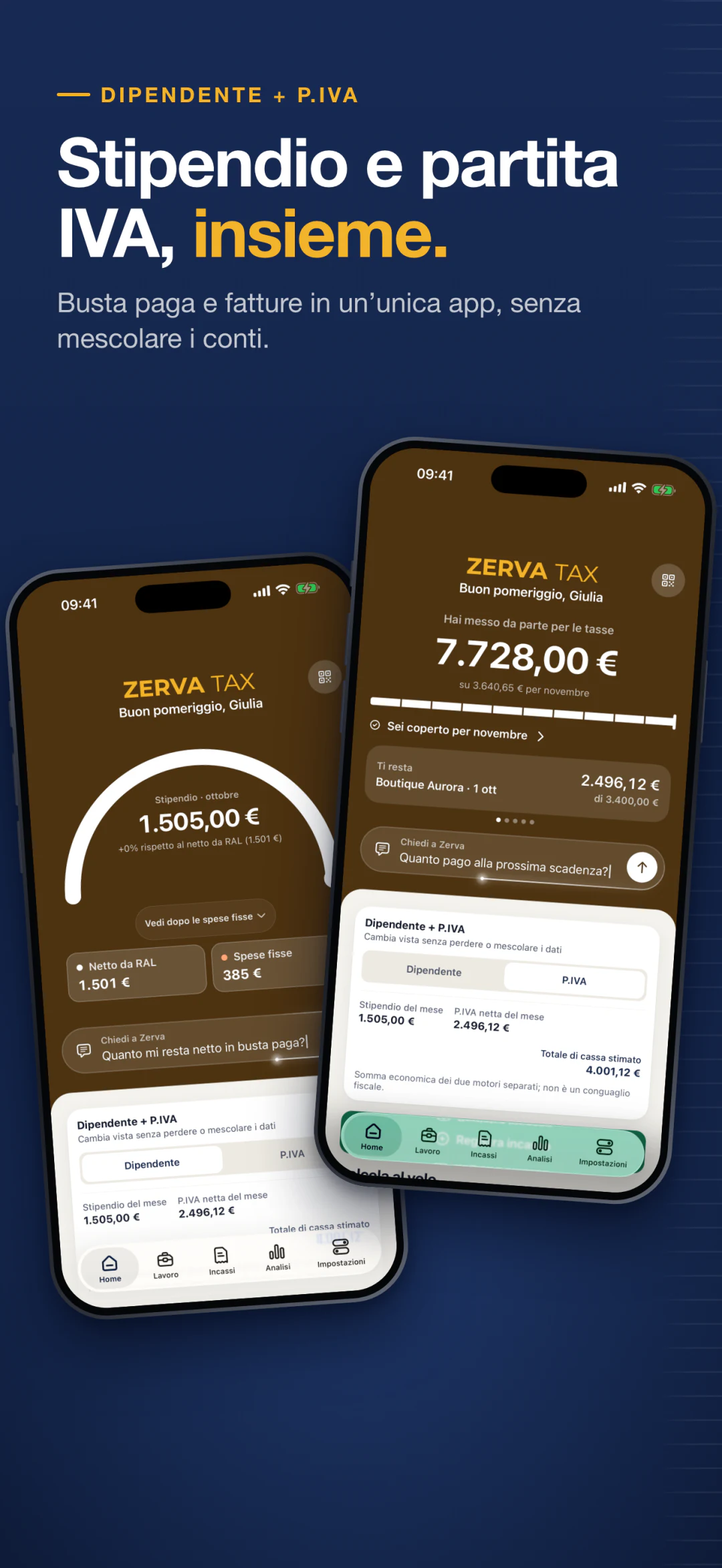
The hardest caseEmployee with a partita IVA
Salary and invoices together: Zerva adds up your income and gets you ready for the year-end adjustment. And it warns you if your salary goes over €35,000, the limit for staying in the forfettario.
INPS Gestione Separata, artisans and traders, and 11 professional pension funds with 2026 minimums.
Coming soon to the App StoreHow it works
How it works: three steps, a few seconds.
Set up your profile
Regime, line of work and, if you have one, your salary. Three screens, no account, no email.
Log a payment
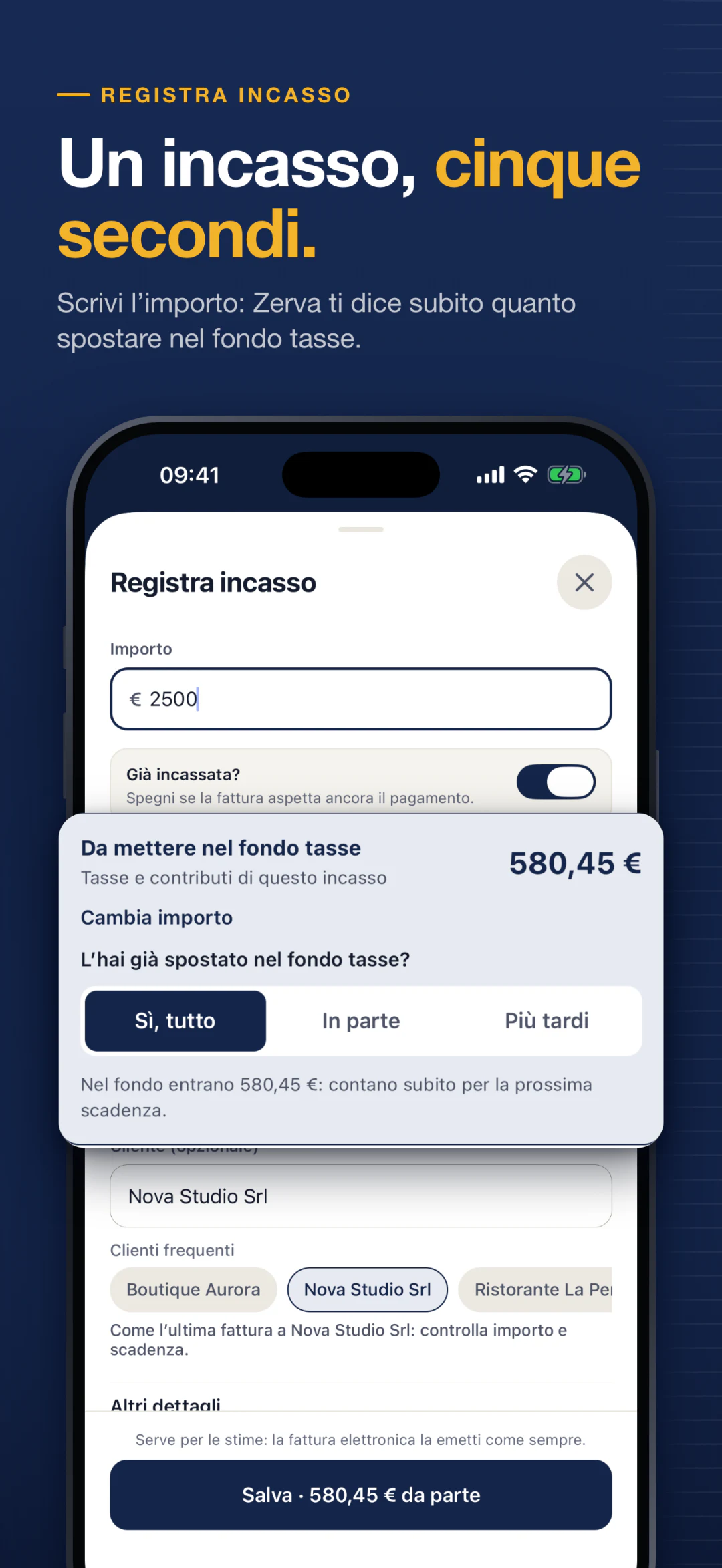
Type the amount. Zerva tells you right away how much to move to your tax fund and how much is left for you.
Reach every deadline covered
See the next deadline, how much you've already covered and how much is missing. With a reminder before the day.
Features
Everything a freelancer needs. Nothing more.
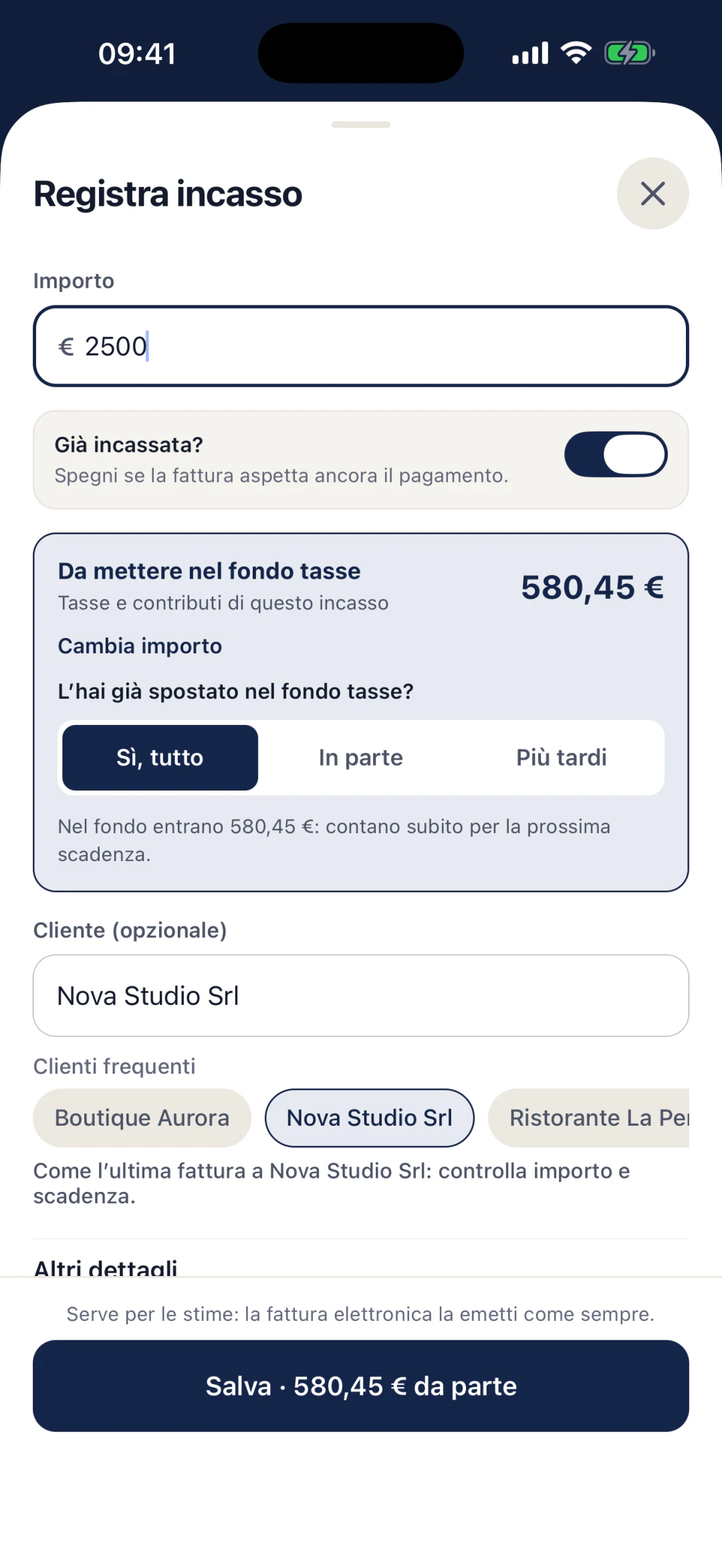
Log a payment
One payment, five seconds.
Type the amount: Zerva tells you right away how much to move to your tax fund.
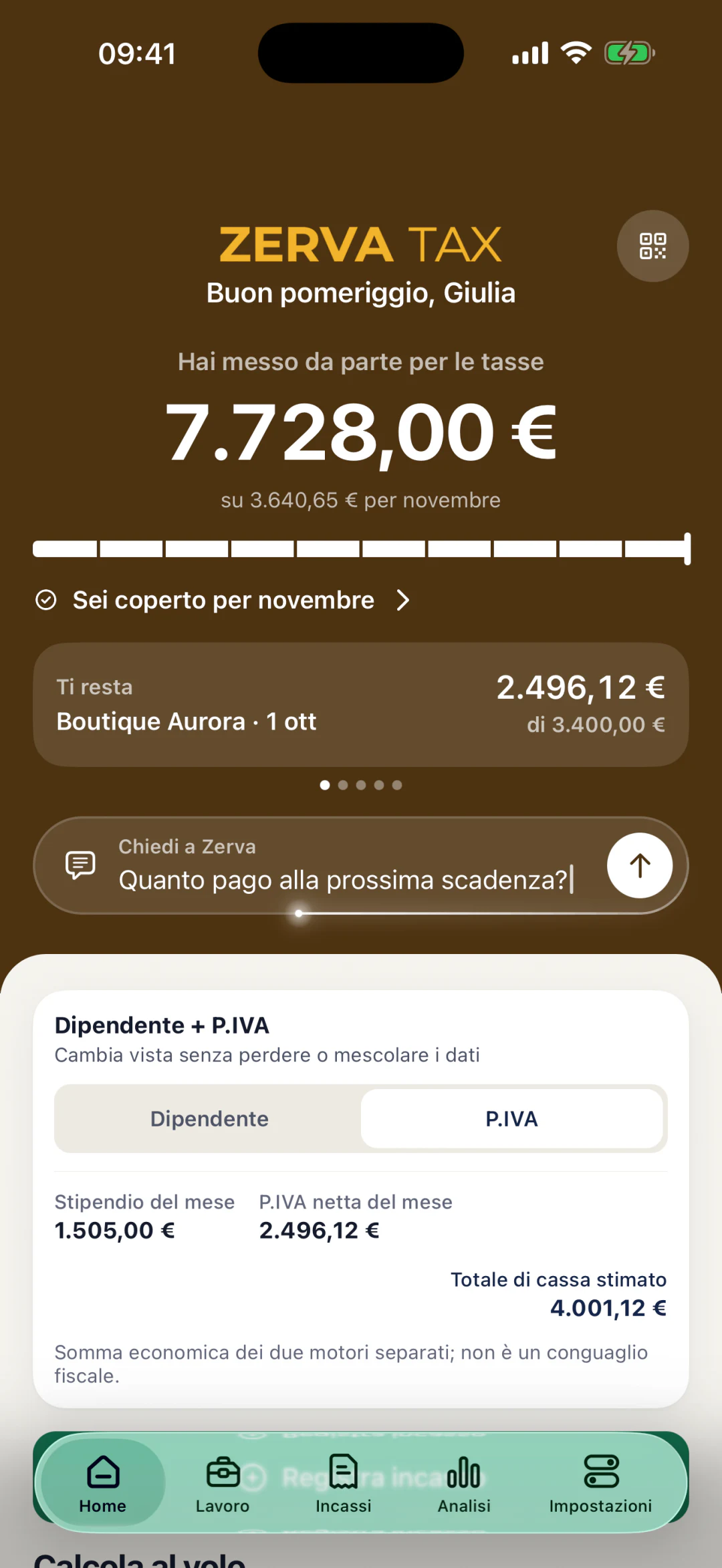
Deadlines
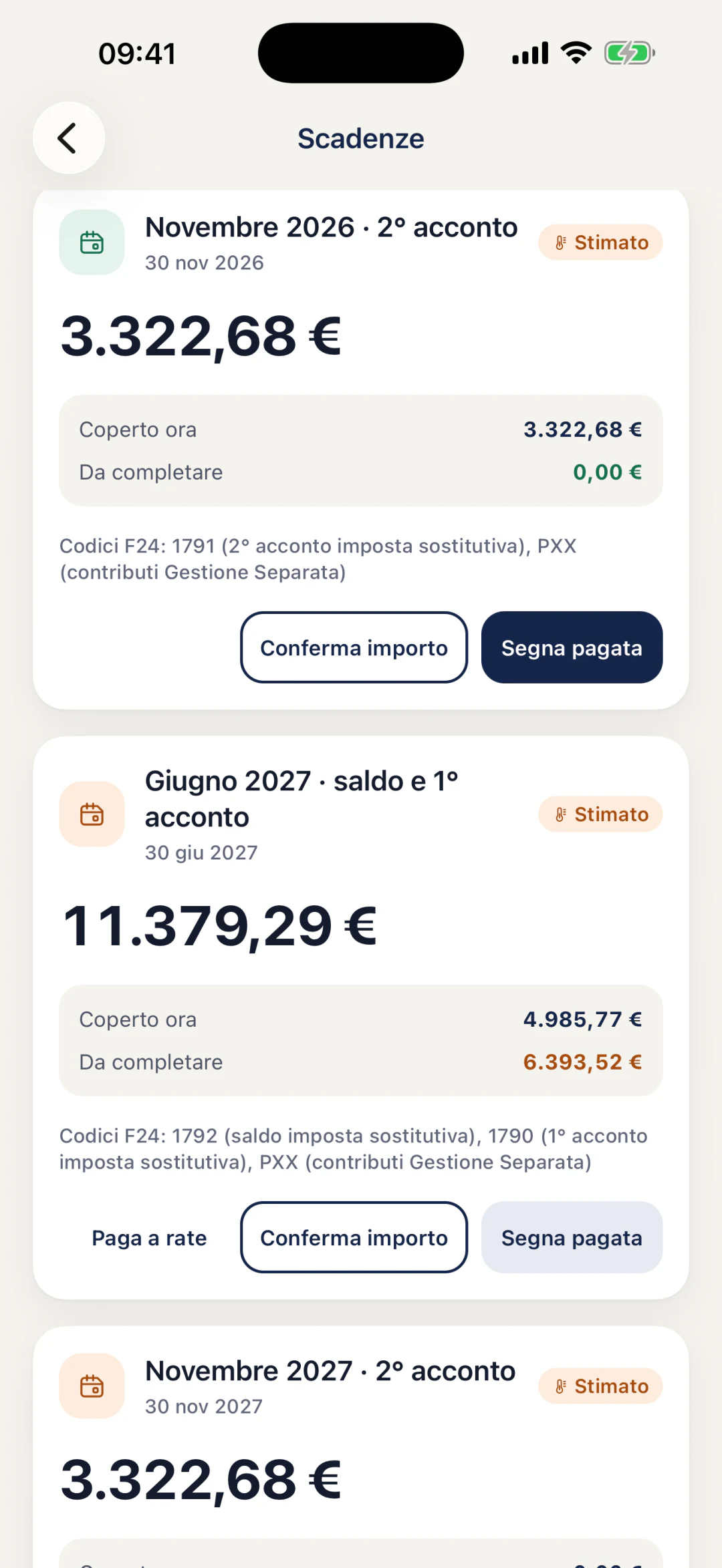
June and November balance and advances, no surprises.
Balance and advance payments estimated from your income, with how much you've already covered.
Safe to spend
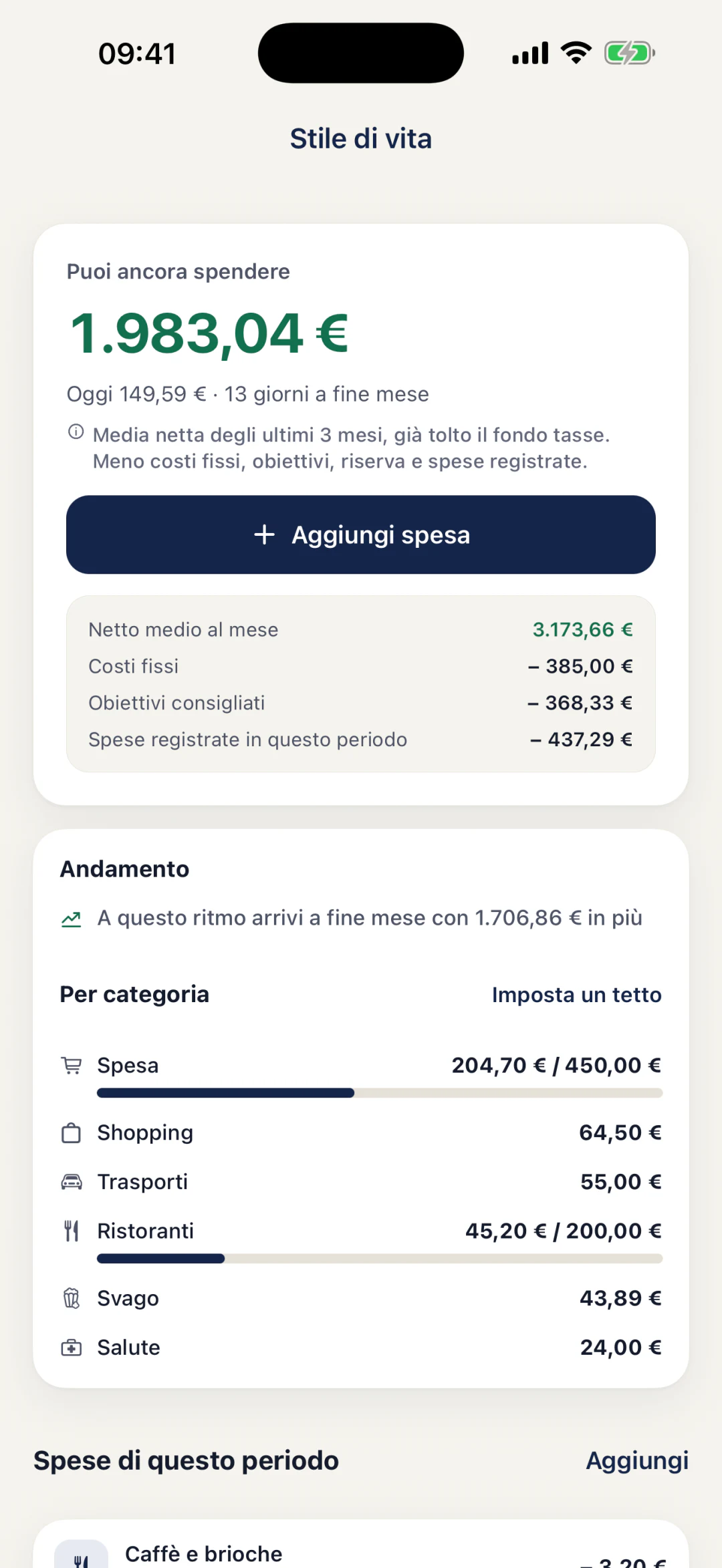
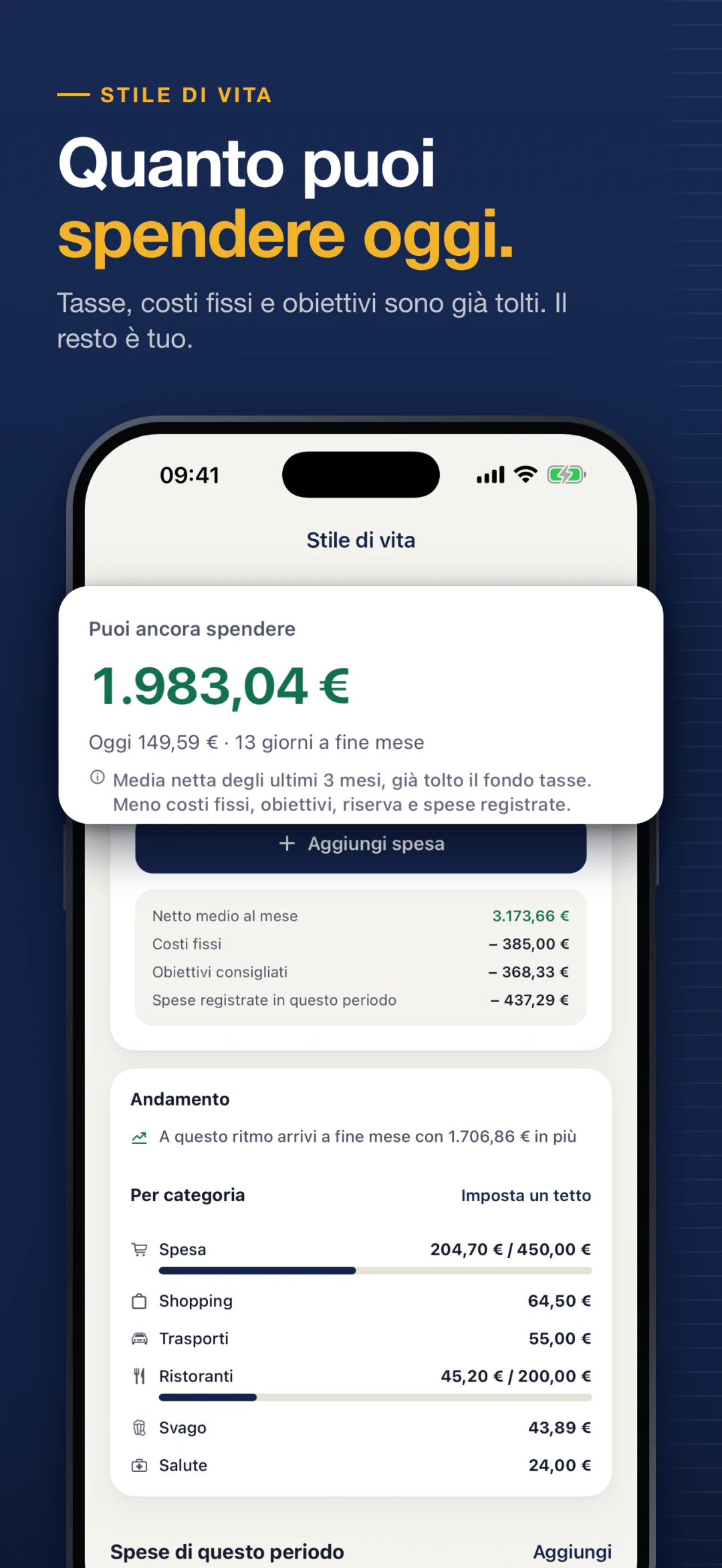
How much you can spend today.
Taxes, fixed costs and goals are already taken out. The rest is yours.
Employee + partita IVA
Salary and partita IVA, together.
Payslips and invoices in one app: Zerva accounts for your combined income without mixing up the numbers.
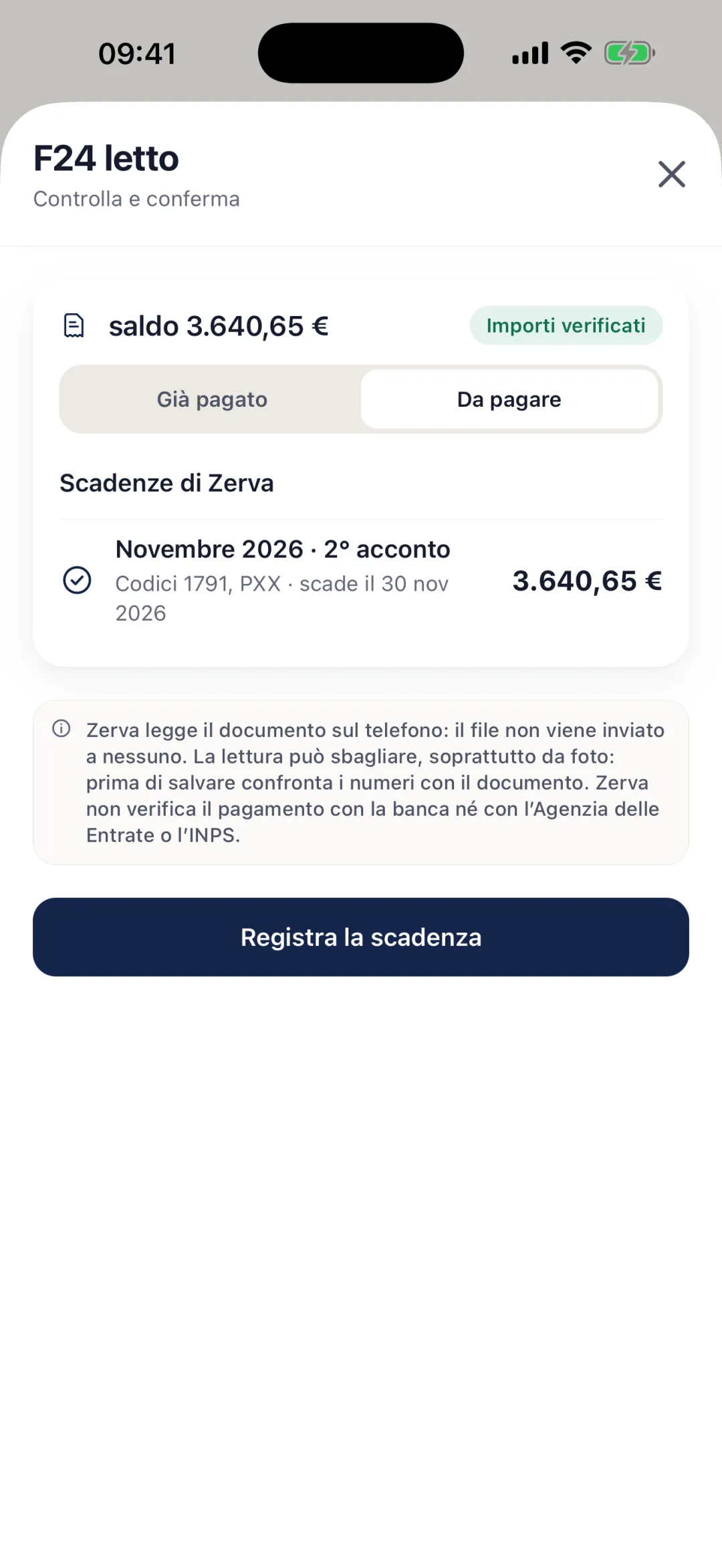
Read documents · Pro
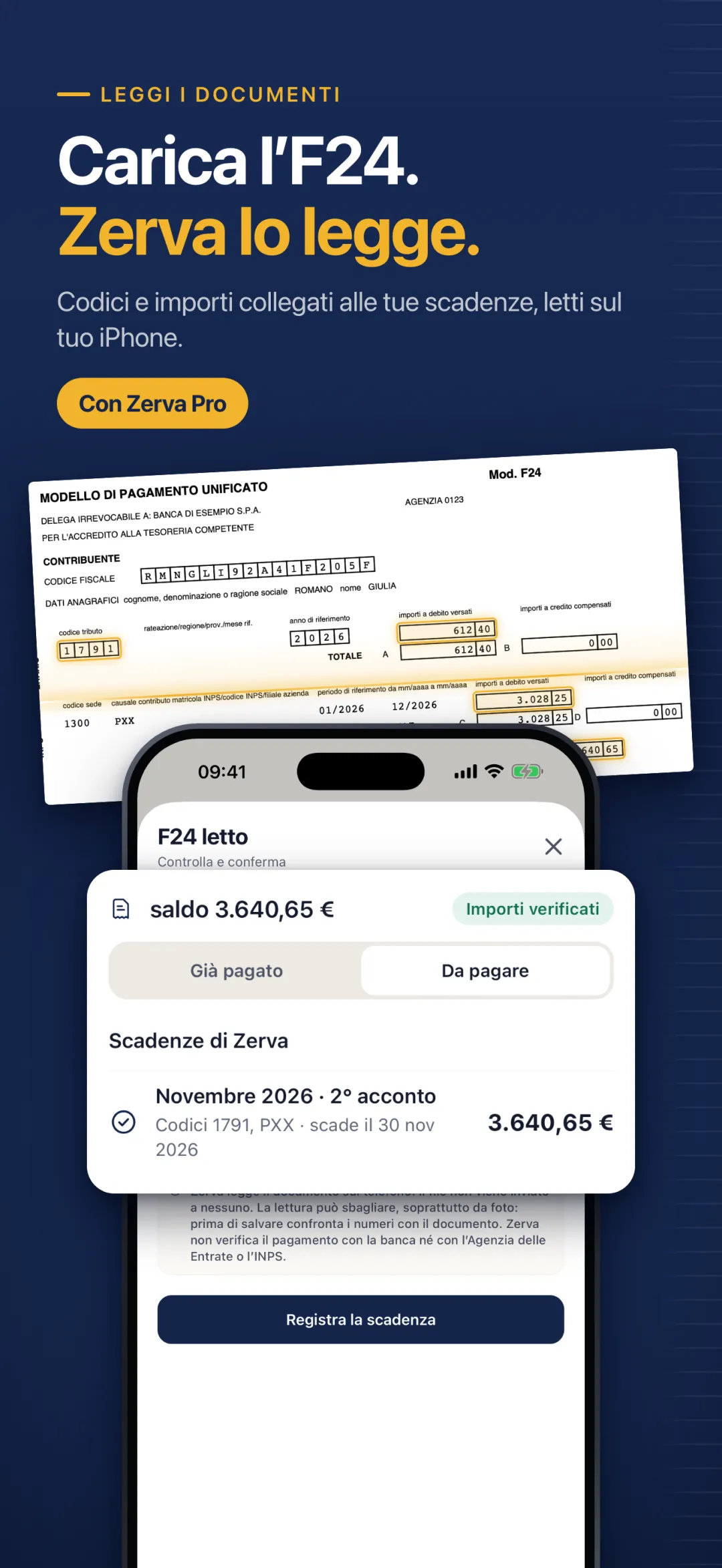
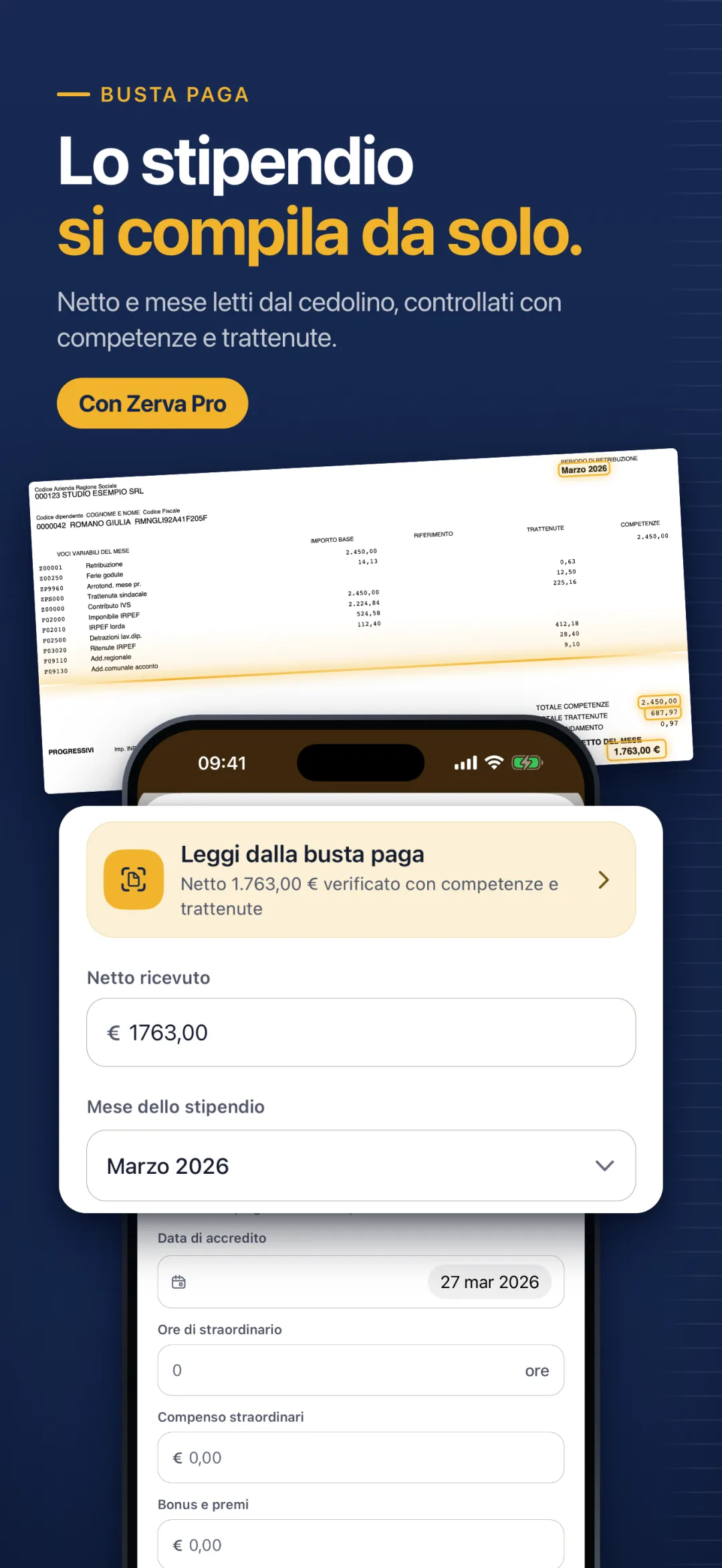
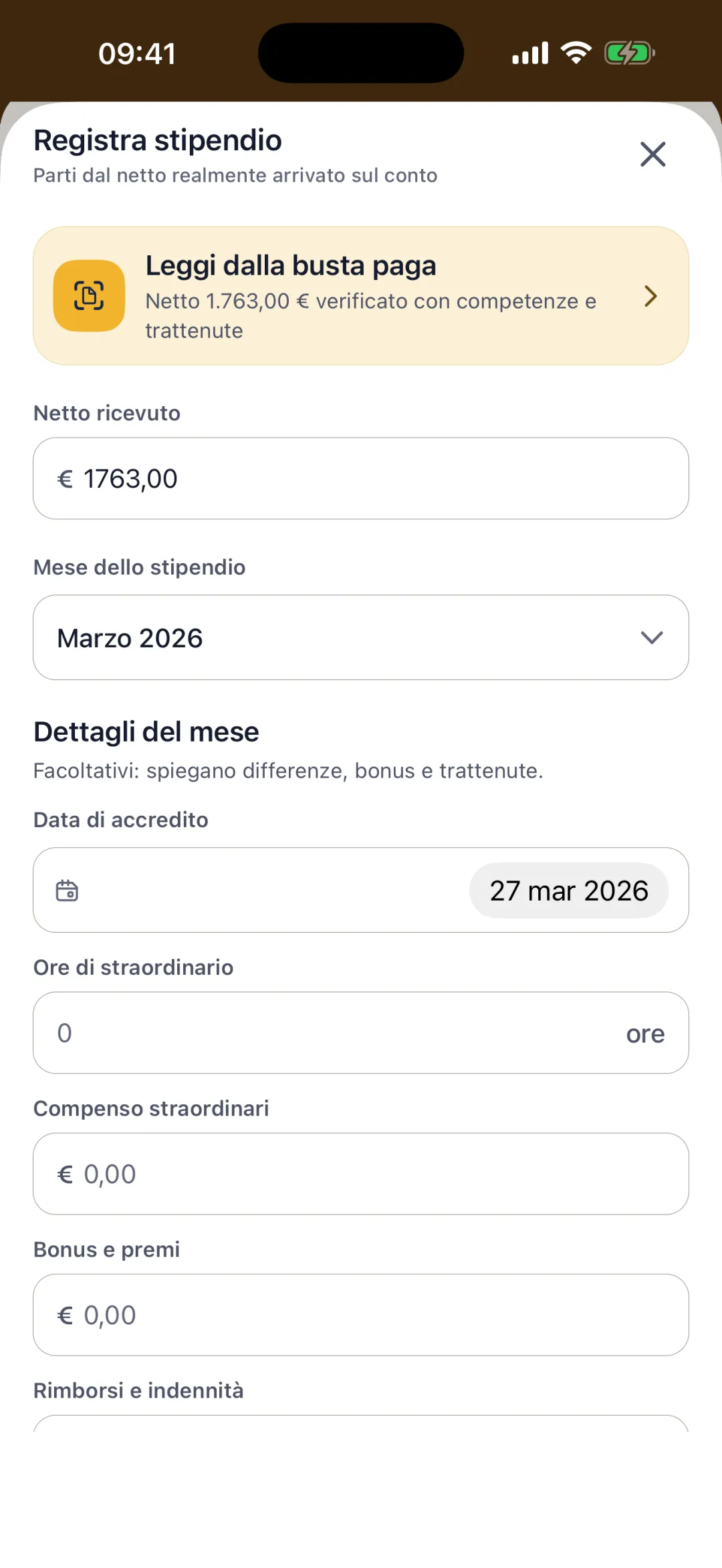
Upload F24s and payslips. Zerva reads them.
F24, CU and payslips read on your iPhone: codes and amounts link to your deadlines, net pay to your salary. Every figure is checked against the document's totals, and nothing is saved without your confirmation.
Beyond taxes
Not just taxes. Money, work and clients in one app.
Household spending, clients, quotes and documents sit right next to your taxes. So you always know what's yours.
Your money
Home and business, kept apart.
Lifestyle
Rent, subscriptions and other fixed costs come out of Safe to spend automatically. If you're an employee, your 13th and 14th month pay go into the plan too.
Business expenses
Software, equipment, courses and travel in a separate list. Under the ordinary regime they lower your taxable income; under the flat-rate regime they show what your business costs.
Savings goalsPro
Amount, date and priority, with the instalments you've paid in. Zerva suggests where to start, like a safety cushion if you're on a fixed-term contract or a variable salary.
Cash forecastsPro
Account balance, what's free today and your reserves. Expected income and expenses don't touch what's available until they actually happen.
Your work
Clients and deliveries, without heavy management software.
SchedulePro
Deliveries and appointments with client, estimated time and expected value, taken from your price list.
Price listPro
Pricing models, internal hourly cost and availability for each service.
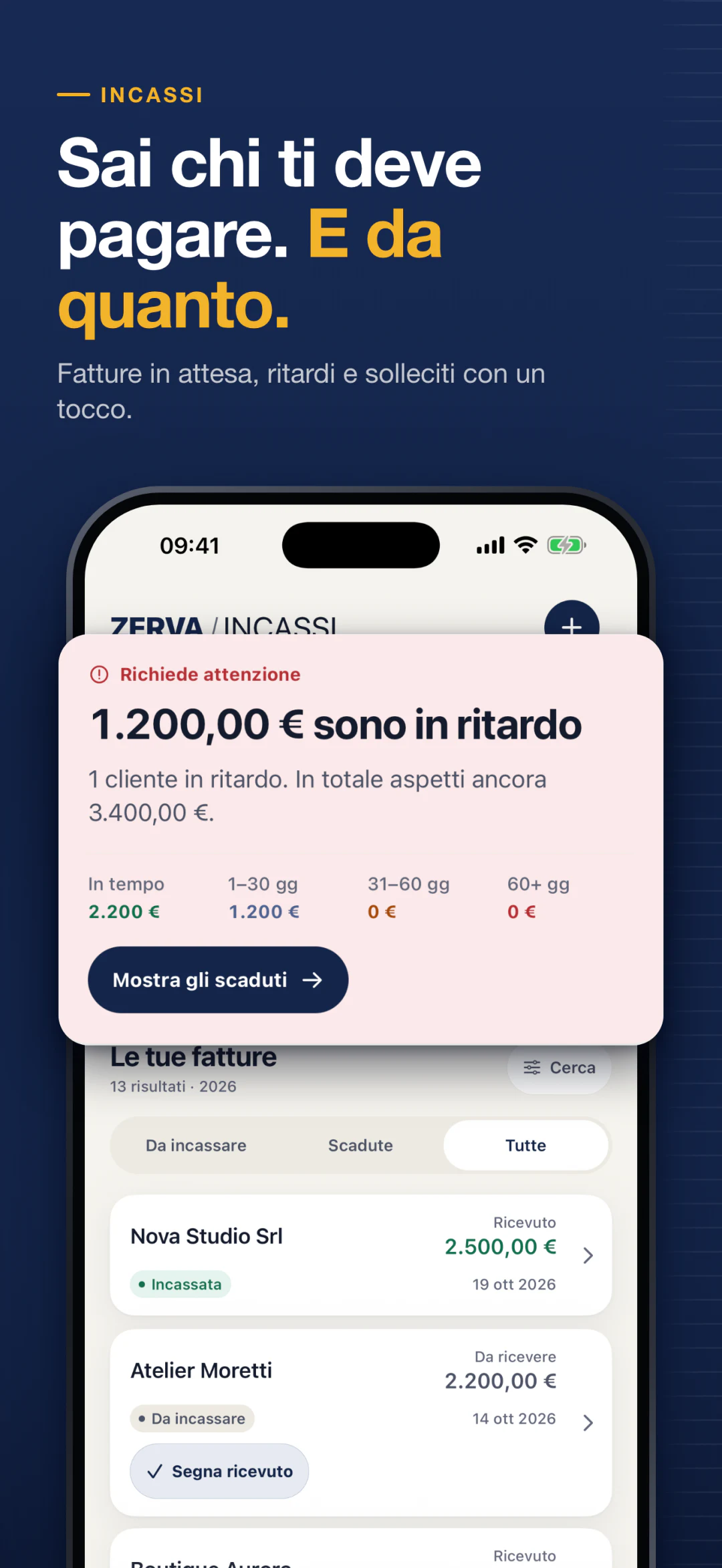
Client card
Billed, collected, outstanding and overdue for each client. If a payment is late, a reminder goes out in one tap.
Profitability per clientPro
Average time to pay, accepted quotes, margin and the cost of your time. And how much each client weighs on your revenue.
Your documents
Signed quotes, ready in a few taps.
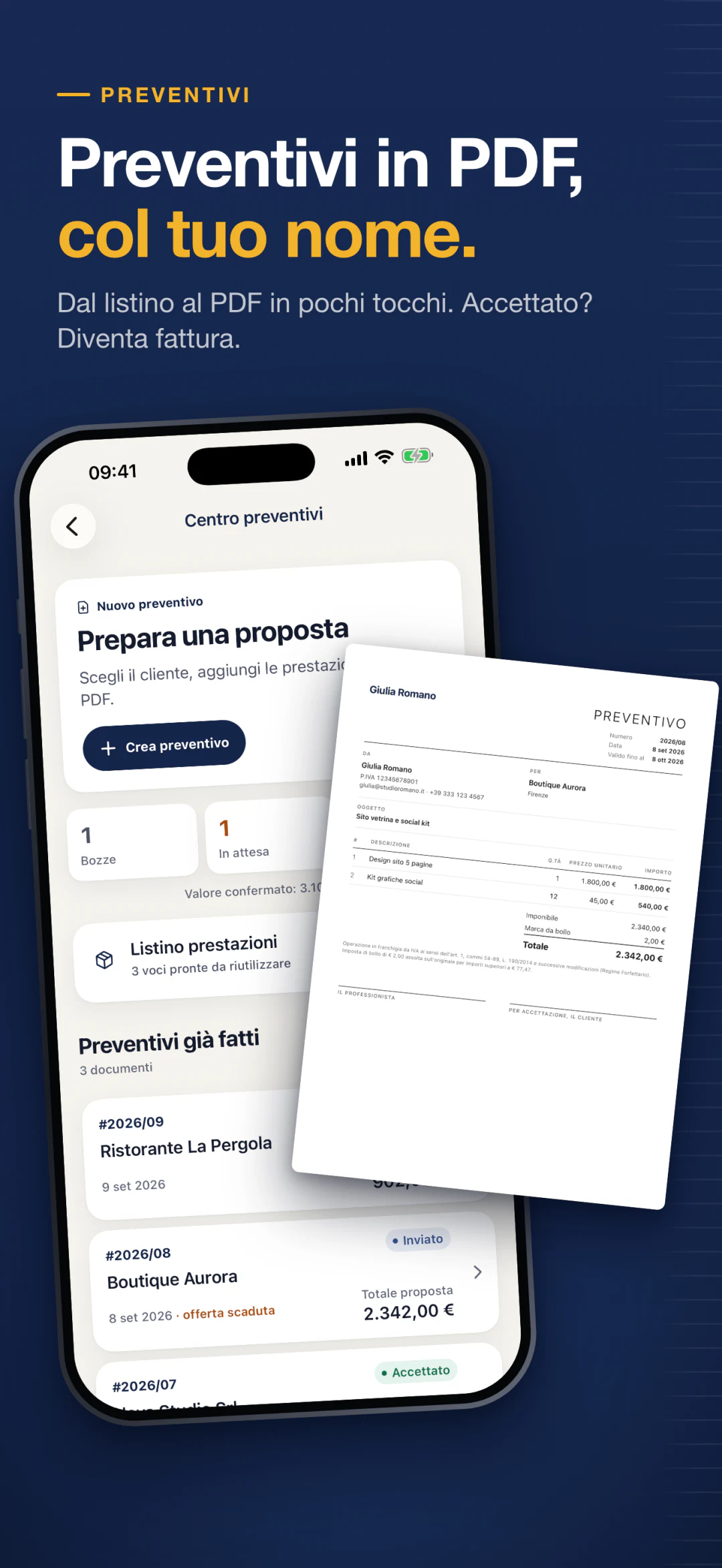
PDF quotes
From price list to PDF with your business's logo, colour and details. Sign by hand on the screen and preview it before sending. With Pro, no Zerva branding.
From quote to invoice
Accepted? It becomes an invoice in one tap, already linked to the client. It stays inside Zerva: the app doesn't issue or transmit invoices.
For your accountant
Export a file for Excel, free. With Pro, a PDF summary report too.
Business card with QRPro
Whoever scans it saves you to their contacts.
ToolsPro
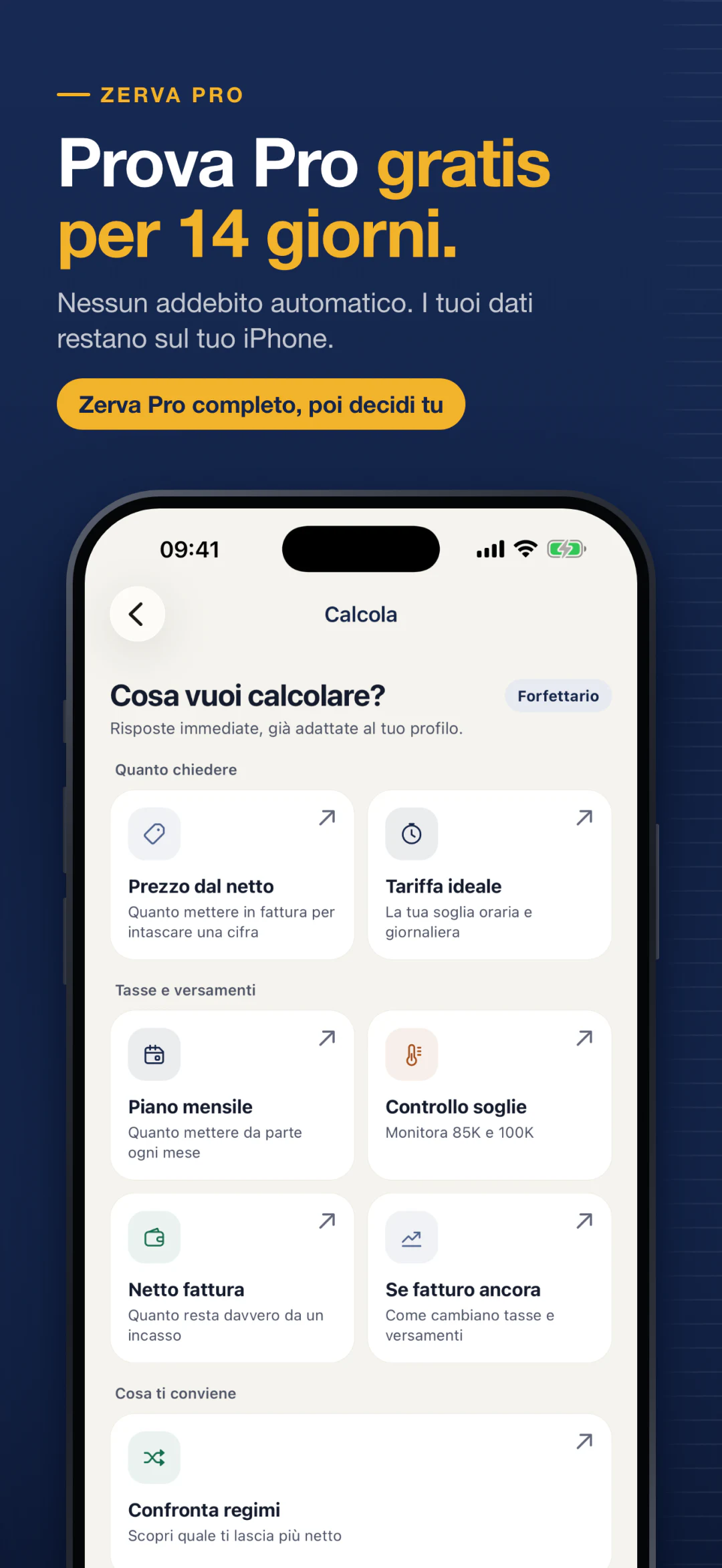
Thresholds, VAT, withholding tax, TFR and net to gross salary, all in one place.
Guide and glossary
A practical guide to the partita IVA and a glossary with the terms that apply to your profile.
Ask Zerva
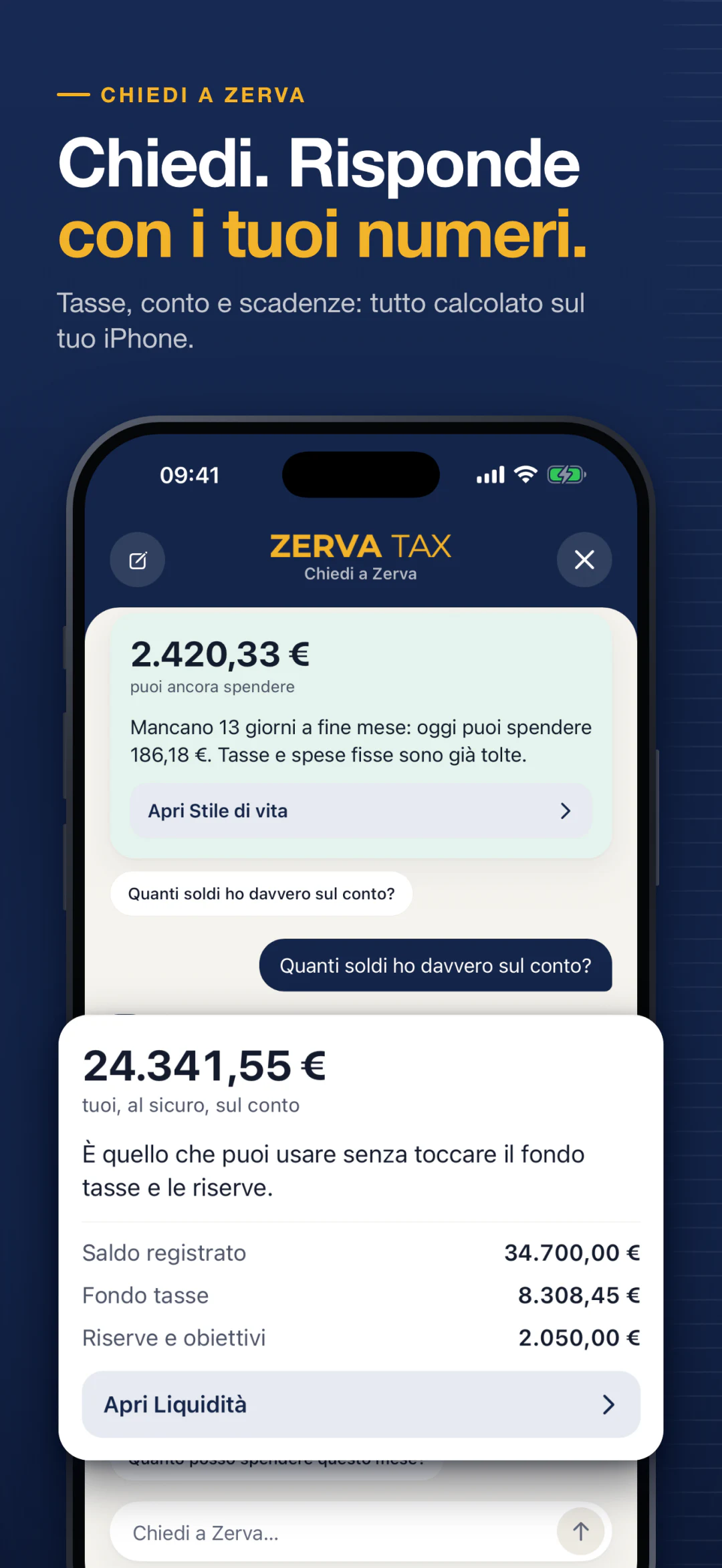
Ask a question. It answers with your numbers.
Type your question or pick a suggested one: Zerva answers instantly, using the data you've entered. Questions and answers are in Italian.
No made-up answers
Every figure comes from the same calculations you see on Home and Deadlines.
With the official source
Answers about tax rules cite the Agenzia delle Entrate and INPS.
If it doesn't understand, it says so
Instead of guessing, it asks you to rephrase the question.
All on your iPhone
No question ever leaves your phone.
Questions about today are free. Questions about the future and simulations are part of Zerva Pro.
How much do I have to pay in June?
Who still owes me money?
What is the November advance?
Suggested questions
- How much can I spend this month?
- How much did I earn in September?
- I'm an employee: can I stay in the forfettario?
Privacy
Your numbers stay yours.
To verify your subscription and receive crash reports we use two external services, which only receive an anonymous identifier.
Read the privacy policy (in Italian)On your iPhone
Payments, invoices, clients, tax profile and scanned documents stay on your phone.
No account
No sign-up, no email, no password.
No ads
No ads and no tracking.
Face ID, if you want
Lock the app with Face ID from the settings.
Pricing
Free for today. Pro for what's next.
Every new install includes 14 days of full Zerva Pro. When the trial ends you go back to Free: no automatic charge.
Free
€0forever
- Unlimited payments and invoices
- How much to set aside on every payment
- How much you can spend
- Your next deadline, with amount and fund coverage
- Clients, quotes and deadline reminders
Zerva Pro
Launch offer€49.99first year
Then €59.99 a year · or €6.99 a month. 14-day trial included.
- Full deadline calendar and June/November simulator
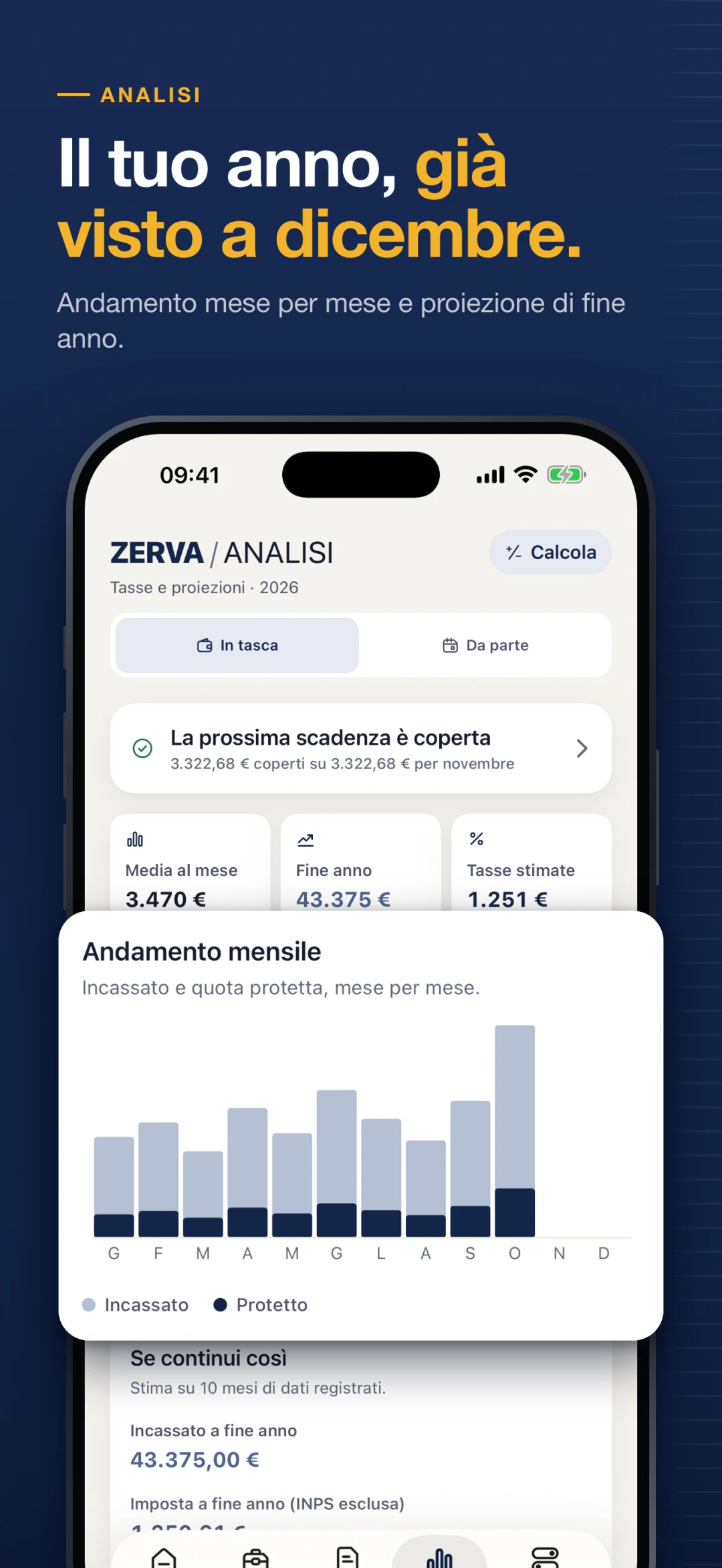
- Year-end projection and monthly plan for your tax fund
- Cash flow forecasts, savings goals, profitability by client
- Work calendar, service price list and advanced tools
- Unbranded quotes, PDF report for your accountant, QR business card
- Automatic reading of F24, CU and payslips
Auto-renewing subscription, cancel anytime from your Apple ID settings. Prices include VAT.
Free or Pro
What changes, line by line.
Free tells you where you stand today. Pro tells you where you're heading: every deadline of the year, how much to set aside each month and how much you'll pay at year end.
| Feature | Free | Pro |
|---|---|---|
| Taxes and deadlines | ||
| How much to set aside on every payment | ||
| How much you can really spend | ||
| Payments and invoices | Unlimited | Unlimited |
| Next deadline with amount and fund coverage | ||
| Reminders 30 and 7 days before June and November | ||
| Full deadline calendarAmounts and coverage for every deadline, including next year's | Next one only | |
| Monthly planHow much to put in the fund each month, with a reminder on the 1st | ||
| June and November simulatorBalance, advances and fund coverage | ||
| June instalment plan | ||
| Year-end projectionHow much tax you'll pay, in detail | ||
| Money and planning | ||
| Monthly expenses | ||
| Spending trendsEnd-of-month forecast, comparison with last month and budget by category | ||
| Cash flow forecastsExpected income and expenses: know in advance if your account holds up | ||
| Savings goalsSuggested monthly amount for each goal, in order of priority | ||
| Clients and work | ||
| Clients | ||
| PDF quotes | Zerva branded | Unbranded |
| Profitability by clientPayment times, client dependency and real margin | ||
| Work calendarPlanned jobs, expected value and deliveries by client | ||
| Service price listPrice, time and hourly cost of each service | ||
| QR business card | ||
| Ask Zerva and documents | ||
| Questions about todayTaxes, deadlines, payments, expenses and tax terms | ||
| Questions about the future and simulationsRegime comparison, gross from net, pay rise, TFR | Preview only | |
| Reading F24, CU and payslipsFrom PDF or photo, read on your phone | Manual entry | |
| Accountant and privacy | ||
| CSV export | ||
| PDF report for your accountant | ||
| Data only on your phone, no account | ||
14¢
a day, first year
€49.99 for the whole launch year: less than a euro a week.
−40%
vs. monthly
€49.99 instead of 12 × €6.99 = €83.88. From the second year €59.99, still −28%.
14 days
of full Pro, free
When it ends you go back to Free with no charge. What you created stays readable.
The comparison
A spreadsheet won't warn you. Zerva will.
| What you need | Spreadsheet | Accountant only | Zerva |
|---|---|---|---|
| Know how much to set aside on every payment | If you know the formula | Only if you ask | Yes, automatically |
| Warns you before June and November | No | Sometimes | Yes, with reminders |
| Salary and partita IVA together | Hard | Yes, at year end | Yes, during the year |
| Answers your questions whenever you want | No | During office hours | Yes, with Ask Zerva |
Zerva doesn't replace your accountant: it gets you to them prepared.
FAQ
Before you download it.
Does Zerva replace my accountant?
No. Zerva helps you set aside the right money during the year and prepares a summary to bring to your accountant. The tax return is still their job. Zerva does not issue or submit invoices or tax documents.
Does my data end up on a server?
Your tax data doesn't: payments, invoices, clients and profile stay on your phone, and no account is needed. To verify your subscription and receive crash reports we use two external services, which only receive an anonymous identifier.
How accurate are the estimates?
They are indicative estimates, based on current tax rules and the data you enter. The more payments you log, the closer they get. The final figure is set by your tax return.
Does it work if I'm an employee and also have a partita IVA?
Yes. Enter your salary and Zerva accounts for your combined income. It also warns you if your salary goes over the limit for staying in the forfettario.
Which regimes and pension funds does it support?
Four situations: forfettario, ordinario, employee and hybrid (employee with a partita IVA). For contributions: INPS Gestione Separata, artisans and traders, and 11 professional pension funds with 2026 minimums.
What happens after the 14 days?
You go back to the Free plan, which stays free with no limits on payments or invoices. No automatic charge: you only pay if you choose Zerva Pro.
Is the app in English? Is there an Android version?
Not yet. Zerva is iPhone only, in Italian, on the Italian App Store. The tax terms it uses (F24, INPS, acconto, saldo) are the same ones your accountant and the Agenzia delle Entrate use.
Does Ask Zerva use artificial intelligence?
No. It recognizes your questions and answers with the app's own calculations, on your iPhone. That's why it doesn't make up figures: if it doesn't understand a question, it tells you.
What can I ask Zerva?
Taxes and deadlines, how much you can spend, payments by client or period, quotes, expenses and what tax terms mean. Questions about today are free; questions about the future and simulations are part of Zerva Pro.
I already have an invoicing app. Do I need Zerva too?
They do two different things. Your invoicing app issues the documents; Zerva tells you how much of that money is yours and how much to set aside for taxes and INPS.
Can I use it if I've just opened my partita IVA?
Yes, it's actually the best time. In your first year you usually pay no advances, but the following June the balance and the first advance come due together. With Zerva you set money aside from your very first payment.
Does Zerva read F24, CU and payslips?
Yes, with Zerva Pro. Upload a PDF or take a photo: Zerva reads codes, amounts and net pay on your phone, without sending the file to anyone. Figures confirmed by the document's totals are marked as verified, the others as to be checked, and nothing is saved without your confirmation. Entering data manually stays free.
Zerva Tax for iPhone
Your next F24, already set aside.
Download Zerva and log your first payment: in a few seconds you know how much is really yours.
Zerva provides indicative estimates based on current Italian tax rules: it does not replace your accountant and does not issue or submit invoices or tax documents. Zerva is not affiliated with the Agenzia delle Entrate or INPS.